
From Quote to Contract: How Salesforce and Documill Standardize B2B Customer Contracting
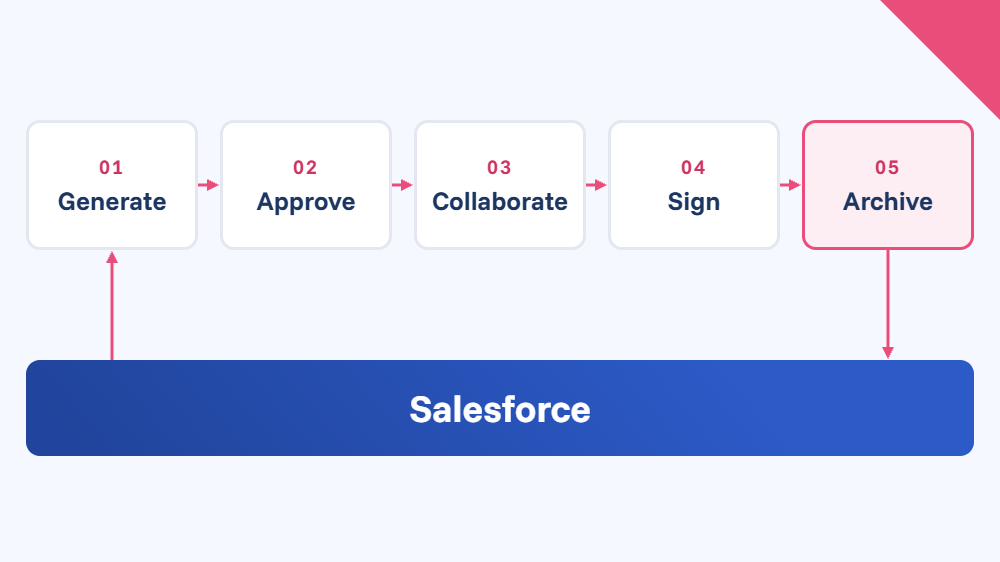
The quote-to-contract journey can run as one clean, standardized flow inside Salesforce. Here’s how it it pays off with Documill – with or without a CPQ.
Let’s be honest: most B2B contracting processes weren’t designed. They just happened. A sales rep copies a quote from the last quarter, swaps in a new customer name, double-checks the prices against Salesforce (hopefully), emails a PDF, waits, chases, and then someone in legal rebuilds the whole thing as a contract. Despite the professional touch, each handover is a chance for a typo, an outdated clause or a discount nobody approved.
Or aren’t there days when we are sleep deprived, too worried about this or that or just plain bored, each and one of us? For a B2B sales rep, such a day can come with a substantial cost.
World Commerce & Contracting estimates that inefficient contract management costs companies up to 15% of their annual business value.
Take manufacturers and automotive companies. For them, that’s not a minor annoyance. Business deals involve complex product configurations, negotiated pricing, multiple markets and languages, and corporate buyers whose procurement and legal teams expect exact answers fast.
The good news? The quote-to-contract journey can run as one clean, standardized flow inside Salesforce. Here’s how it works with Documill – with or without a CPQ – and why it pays off.
After evaluating alternatives, we chose Documill Generate, largely because of its ability to handle the more intricate demands that come with Salesforce CPQ integrations. These were demands that simpler document tools typically just can’t meet.”
– Caroline Calegari, Team Lead CRM Applications, Komax, Switzerland
One template, two lives: from quote to contract
The trick is simple: the quote and the contract are built from the same template, filled with the same live Salesforce data. The document doesn’t get rebuilt along the way. It grows up.
- The rep clicks a button on the Opportunity. Documill pulls in everything it needs from Salesforce (the customer account and contacts, products, quantities, prices, discounts, delivery terms) and drops it into dynamic fields in an approved template. Conditional logic decides which sections belong: SLA terms and clauses with the right legal wording are added, and a German distributor gets automatically a german version, while a Swedish gets a swedish.
- Internal approvals run on autopilot. If the deal needs a sign-off (say, a volume discount over the threshold or non-standard payment terms), the workflow routes it to the right people automatically. No one forwards PDFs around asking “is this OK?”
- The quote goes to the customer – by email, portal or mobile, whichever fits. If the buyer’s procurement or legal team wants to tweak something, both companies can comment and redline in the same document instead of trading attachments. Indeed, Gartner found just recently that 70% of B2B buyers now prefer a completely digital, self-service buying experience.
- The customer approves, and the quote becomes the contract. The agreed terms, clauses from the clause library and the final figures lock in, and the document goes out for e-signature. Once the authorized signatories on both sides have signed, you have a binding contract.
- Everything lands back in Salesforce. The signed contract is archived next to the Opportunity object, with a full audit trail of who did what and when.
- Same data, same template, one continuous thread from the first offer to a signed deal.
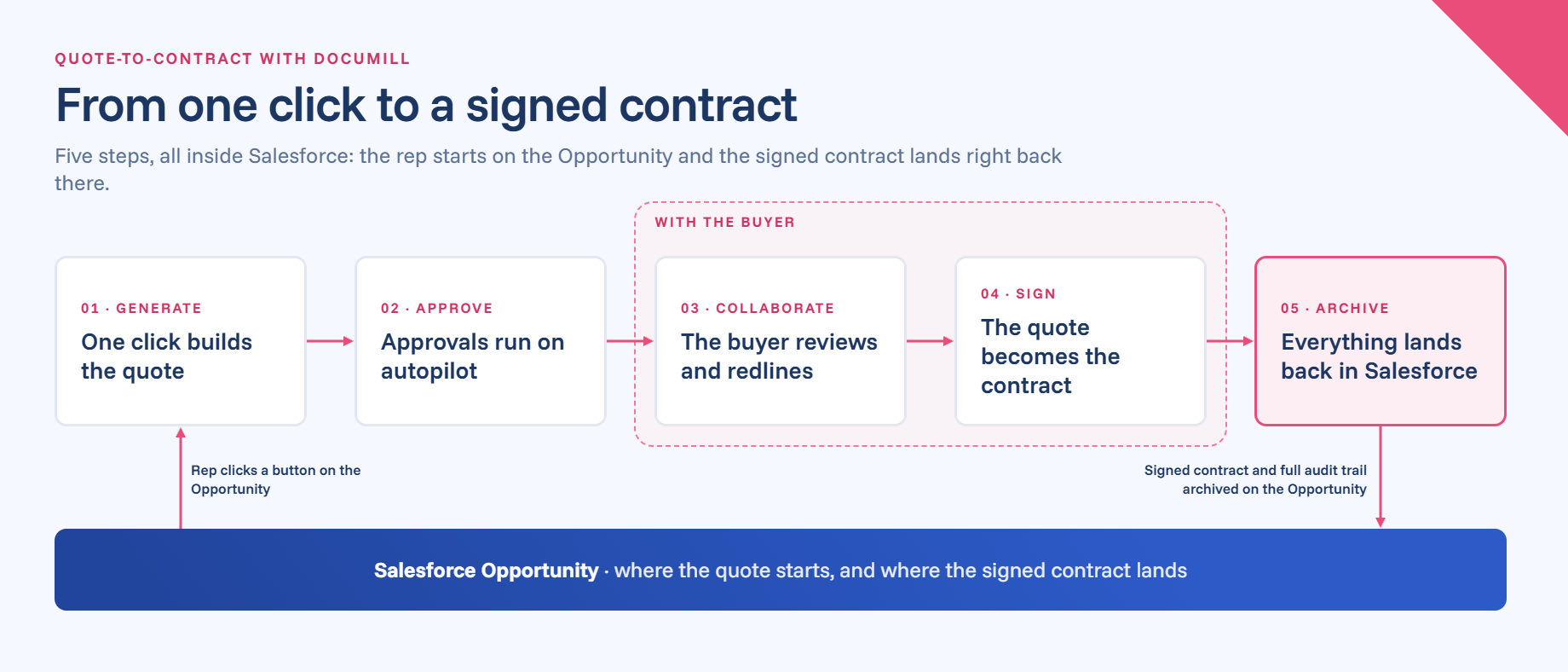
Figure 1. Documill Workflow from one click to a signed contract
Why an automated quote-to-contract flow pays off
Before we get to speak about the actual tool, let’s look at how the workflow itself changes the game:
- Speed. Quotes that took hours (or days, if someone was on holiday) are ready in seconds. Faster quotes mean faster yeses, and deals close while the buyer’s budget and interest are still there.
- Accuracy. When the numbers come straight from Salesforce, nobody retypes a price or a part number. Copy-paste errors simply have nowhere to happen.
- Standardization. Every rep, in every market, sends the same approved layout and the same approved legal language. Your brand looks consistent, and legal stops finding creative edits to clause 7. Buyers notice when this slips: 69% report inconsistencies between what a supplier’s website says and what its sellers tell them (Gartner, 2025).
- Control. Approval rules are built into the flow, so a discount can’t slip out the door unchecked.
- Visibility. Managers see where each quote and contract stands, right in the CRM. No more “let me check my inbox” waste of time in the pipeline meeting.
- Happier sales reps. Less admin means more time to actually sell. That’s what you hired the reps for, after all.
As a result, we’ve significantly streamlined our workflows — cutting many of our processing times nearly in half — while improving the accuracy and clarity of the information we deliver to clients.”
— Conquer Credit Management, USA, on Documill
What Documill brings to the party
Plenty of tools can merge data into a PDF. Documill covers the whole journey, without making anyone leave Salesforce.
- It lives inside Salesforce. Documill works right in the Salesforce UI and across Sales, Marketing, Service, Experience, Manufacturing and Automotive Clouds. Reps don’t learn a new system; they click a button they already see. With the right integrations, it can also pull live ERP data from systems like SAP, Oracle or Dynamics. Salesforce found that this matters in 2026: 84% of sales teams without an all-in-one platform plan to consolidate their tools.
- Generation, collaboration, approvals and signing in one. Many companies stitch together a document generator, a redlining tool, a workflow tool and an e-signature service. Documill does all of it, including embedded e-signatures that comply with eIDAS and GDPR. No third-party signing tool required, unless you want one.
- Real contract collaboration. Your customer’s buyers and lawyers, plus your own credit, legal and compliance teams, can comment and redline the same document with role-based access. Negotiation stays in a controlled, traceable space instead of a messy email thread.
- A clause library and no-code workflows. Legal maintains approved clauses once; templates pick the right ones automatically. Admins build and change approval flows without writing code.
- Built for many markets. One template can serve several countries and languages, or you can run market-specific templates in a single workflow. Your call.
- Audit-ready by default. Every action is logged, and finished documents are stored with version control in Salesforce or SharePoint.
In short: this flow isn’t a custom project. It’s what Documill does.
With our highly customized and complex data model, the manual work was time-consuming and risky with errors. And so was rendering the often complex document layouts, for instance, in product tables. We needed a better solution badly”
– Leading European Medical Device Manufacturer on Documill
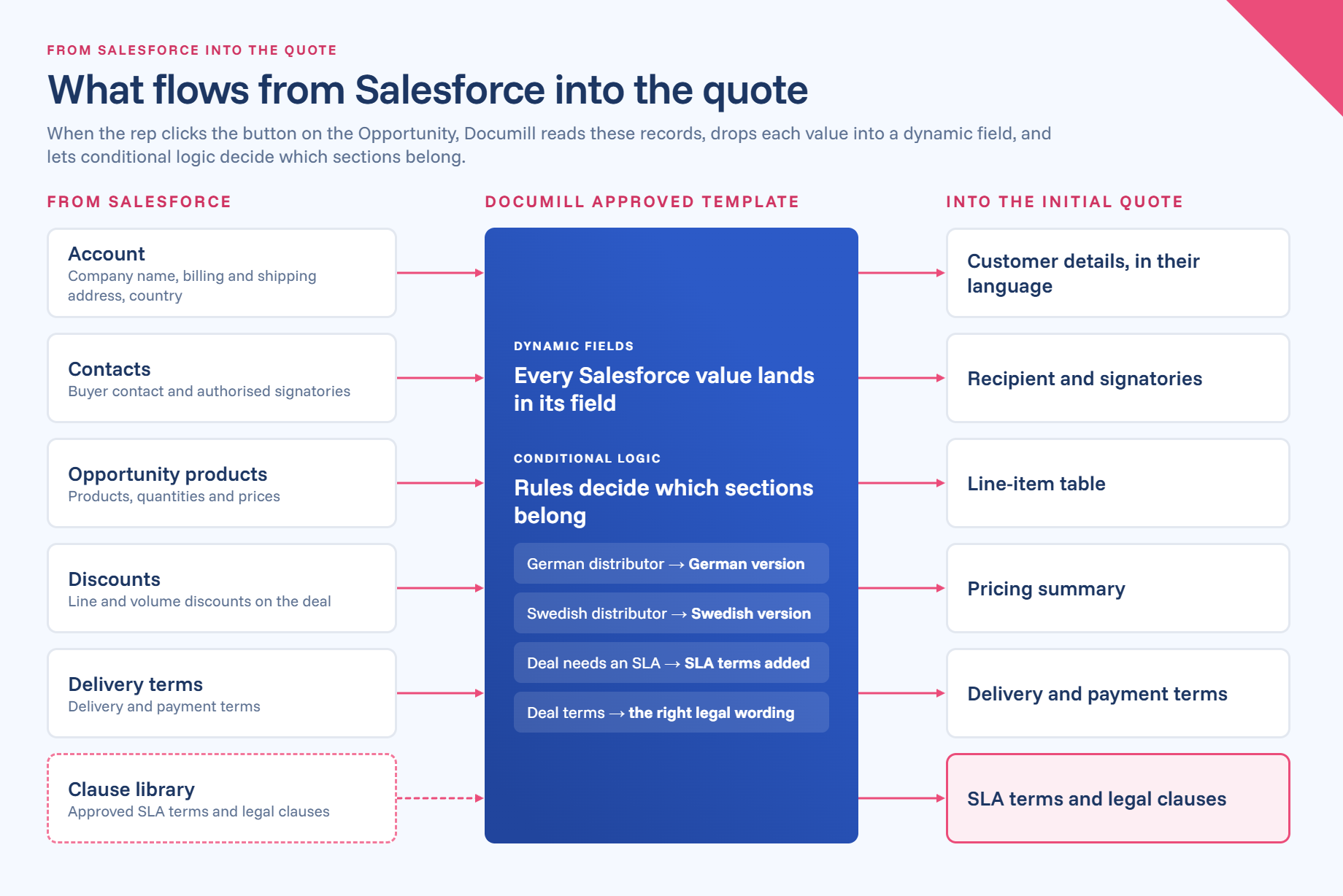
Figure 2. How Salesforce data flows to the quote.
Security you can show your auditors: ISO 27001 and TISAX
Quotes and contracts are full of sensitive stuff: pricing, customer data, product specs. So the question isn’t just “does it work?” but “can we trust it?”
According to Salesforce, 76% of sales pros with agents say customers ask detailed questions about data security, and 51% say security concerns delayed their AI initiatives.
Documill holds ISO 27001 certification, the international standard for information security management, certified by Bureau Veritas. That means security isn’t a promise on a slide; it’s an audited management system covering how data is handled, protected and monitored.
For automotive companies, Documill is also TISAX certified. TISAX is the European automotive industry’s information security standard, and many carmakers expect their suppliers and partners to have it before they share sensitive data. If you work in or around automotive, that box is already ticked, which can save weeks in vendor assessment.
TISAX is now a global benchmark: in December 2025, more than 20,000 locations worldwide held a valid TISAX label for the first time.
Add audit trails and granular access controls, and your contracting holds up when compliance comes knocking.
Don’t just take our word for it
A leading European medical device manufacturer started with “the usual suspects”: high-volume quotes and contracts, for hospitals and clinics, from standard products to fully equipped operating rooms. Manual document work on a complex data model was slow and risky. With Documill, the company standardized its templates, automated the flow from creation to signature, and later added collaborative contract negotiation with customers. As one of its representatives put it: “Documill ticked all the boxes.” (Read the story)
Volkswagen Group set out to rebuild its central contract management to be scalable, automated and fully compliant with its IT security standards. The result: a streamlined contract workflow built on Salesforce, Zuora and Documill. (Watch the video)
Komax had relied on a homegrown tool to generate quotations for years, but the tool had reached end of life and had become too complex to maintain. With Salesforce CPQ at the core of their customer quoting process, Komax needed a solution robust enough to handle their quotations’ inherent complexity — with a proper fit for how their sales teams actually work. “After evaluating alternatives, we chose Documill Generate, largely because of its ability to handle the more intricate demands that come with Salesforce CPQ integrations”. (Read the story)
The bottom line
A quote that turns into a signed contract without a single retyped number isn’t a dream. It’s live Salesforce data and a well-built workflow on one template. And with Documill, you also get collaboration, e-signing, audit trails and certified security in the same package. Your business customers get answers faster, your legal team sleeps better, and your reps get back to selling.